FurlPay on Your Wrist: Introducing the Wear OS App
By Ashutosh Kumar Singh · July 18, 2026 · 10 min read
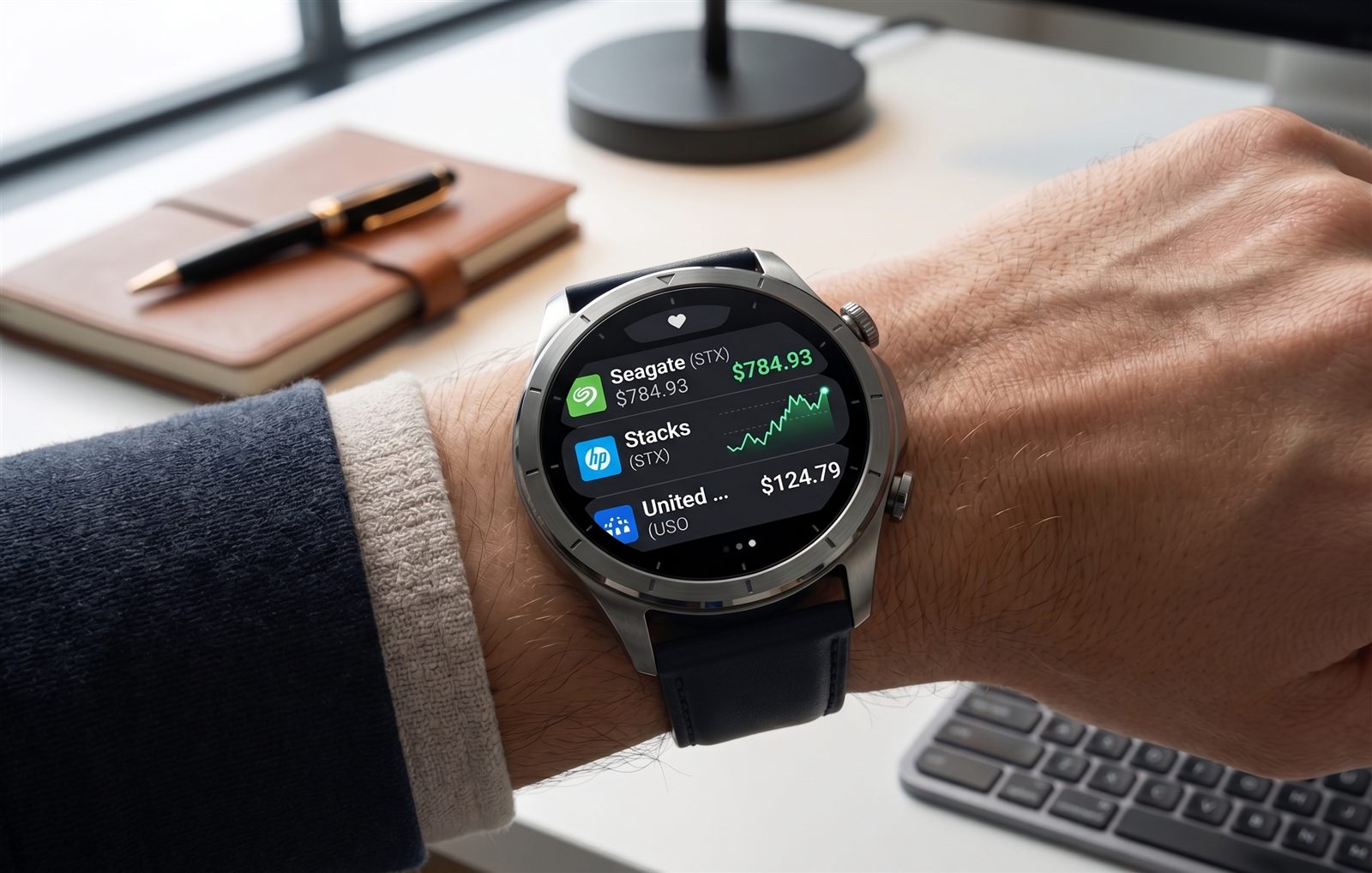
A watch is the most glanceable screen a person owns. You do not open it — you flick your wrist, read one number, and drop your arm. That is exactly the interaction money deserves most of the time: not a full dashboard, but a five-second answer. So we built FurlPay for Wear OS — a companion app that puts your balances, live markets, card controls, travel and a voice assistant on the wrist, and does it without turning your watch into a shrunken phone screen.
This post is the detailed tour: every screen, what it does, and the design and security decisions underneath. The app is built in Kotlin with Wear Compose Material 3, targets Wear OS 5 (tested against the Pixel Watch class of device), and it is open source. Two things to say up front, honestly: it is a companion to the FurlPay account you already have, and it is in active development — validated end to end on the Wear OS 5 emulator against live furlpay.com data, with physical-device testing and a Play Store listing still ahead. Nothing below is a mockup; every screen in this walkthrough runs.
Live markets, on your wrist
The screen on the cover is the watchlist. Each row carries the real brand logo — not a colored letter, the actual mark for Seagate, HP, United States Oil Fund and the rest — pulled from FurlPay's self-hosted asset library, with a two-letter monogram underneath as an instant fallback so a row is never blank or a broken image. Alongside the logo: the live price, the signed daily change in green or red, and a real one-day sparkline drawn from actual price bars. The list sorts by top movers and refreshes on its own every 30 seconds. Because market quotes are public data, this screen renders and updates even before your phone has signed the watch in.
Tap any row and you land on the stock screen — the one that most resembles a trading terminal. A live header with the price and change sits above a full area chart, drawn as a mint gradient fading to black, rendered from real historical bars rather than a decorative squiggle. A timeframe strip lets you switch between 1D, 1W, 1M, 3M, 1Y and ALL, and the chart redraws for each. Below it are two buttons you will recognize from the design: a green + Buy and an outlined − Sell.
Buy and Sell — with a deliberate second step
Placing an order from a watch is powerful, so we made it safe by shape, not just by policy. Tapping Buy or Sell does not fire an order. It opens an amount step with fixed presets — $25, $50, $100, $250 — capped so a fat-finger on a 1.4-inch screen can never move a large sum. Choosing an amount advances to an explicit confirmation: "Buy $25.00 of LCID? Fractional market order," with a single Confirm button and a Cancel. That two-tap flow is the watch analogue of the biometric prompt you would get on the phone — the same principle that guards every sensitive action in the app. Orders are fractional notional, so you buy a dollar amount, not whole shares, and they settle against the same investing engine the FurlPay app uses.
Portfolio, spending and wallet at a glance
Beyond markets, the watch mirrors the parts of your account you actually check on the move:
- Portfolio — your total value and the day's change in dollars and percent, green or red, computed from your live holdings.
- Spending — a running total with Day, Week and Month range chips, so you can answer 'how much have I spent today' without unlocking anything larger.
- Wallet — your balances by token and chain, headlined by the total in USD.
- Home — a clean menu of tonal rows, each led by a hand-drawn vector icon: Markets, Wallet, Cards, Portfolio, Spending, Travel, Receive and Ask Guardian.
Card controls, and a safety asymmetry that matters
The Cards screen shows each card's label, last four digits and status. From the watch you can freeze a card in two taps — the fastest possible response if you think you have lost it or spotted a bad charge. But you cannot unfreeze it from the watch. Un-freezing is deliberately phone-only, behind a biometric prompt. This asymmetry is intentional: the panic action (lock it now) should be instant and always available, while the action that re-enables spending should require the stronger authentication only your phone can provide. A watch that could both freeze and unfreeze with a tap would be a weaker security posture, not a more convenient one.
Receive money with a code
The Receive screen turns your wrist into a payment target. It renders a QR code of your account's receive address, so someone can scan and send you USDC on the spot. The address is cached on the watch, so the code still appears when you are offline — useful precisely in the moments a phone is inconvenient to dig out.
Travel: flights, deals, and book-and-pay from the wrist
The Travel screen brings the FurlPay Travels experience to the watch. It shows your trips with their amount, payment method and status; a live list of flight offers complete with real airline logos, prices and times; and flash hotel deals. Tapping a deal resolves a real bookable property for that city, then shows a confirmation with the nightly rate, dates and an explicit "Book and pay" step. The important detail is that the watch never decides the price — it sends identifiers and a one-time key, and the server computes and owns the final total, deduplicating retries so a booking happens at most once. It is the same server-authoritative pricing model the phone and web use, faithfully carried onto the smallest screen.
Ask Guardian: a voice assistant that cannot spend your money
Press the microphone and you can ask about your money in plain language — "what's my balance," "next flight," "how much did I spend this week." Voice is button-triggered by design; there is no always-listening wake word draining the battery or your privacy. A fast deterministic parser handles the common questions locally, and only falls back to a Gemini model (via Firebase AI Logic) for anything it does not recognize. Crucially, the voice session on the watch is read-only by construction: it can answer, but it declares no money-moving tools at all. Anything that would move funds is refused on the watch and handed back to the phone, where a biometric prompt gates it. The companion phone app additionally offers a full bidirectional live-voice conversation; the watch keeps to the fast, safe subset.
Tiles and complications: the zero-tap layer
The best watch interaction is often no taps at all. FurlPay ships Wear OS tiles — swipeable panels beside your watch face — for your wallet balance, portfolio change, a market snapshot, travel, your next event and a QuickPay receive code. Each tile deep-links straight into its screen, so a tile tap lands on the action, never a menu. It also ships watch-face complications — the small live fields you can place on your own watch face — for your balance, daily spend, portfolio change and next event. Put your balance on your favorite face and it is simply always there.
The other half: Life Guardian
The app carries a second identity beyond money. Life Guardian is an escalating reminder system for the things you genuinely cannot miss. You create a reminder on the phone with a priority, and for critical ones the app arms an alarm ladder that rings on both the phone and the watch, escalating in intensity and bypassing Do Not Disturb. Acknowledging on either device silences both. The schedule survives a reboot — a background heartbeat re-arms the ladder — because an alarm you cannot miss is worthless if a restart quietly disables it. It is a deliberately different discipline from a normal notification, reserved for a small set of truly important events.
Designed for a watch, not shrunk to fit one
Every visual choice serves the wrist. The palette is AMOLED-first: a true-black background, because black pixels are off pixels on an OLED and cost no battery, with a mint accent and cool off-white text. There is not a single emoji anywhere in the interface — every glyph is a hand-drawn vector on one consistent grid and stroke weight, including the FurlPay mark itself, so the set reads as one family and stays crisp at any size. Ambient mode dims the screen rather than blanking it, keeping your balance or next event glanceable when your wrist is down. A considered haptic vocabulary gives each action its own feel. And navigation never goes more than two levels deep, with swipe-to-go-back always honored.
Standalone by design, secure by architecture
The watch is not a dumb terminal tethered to your phone. After your phone syncs a session token — stored in the watch's hardware-backed keystore, never in plain text — the watch talks to furlpay.com directly over its own connection, and falls back to an encrypted on-device snapshot when it is offline. That is what lets markets, cards and travel work even when your phone is in another room. The security model is layered: the freeze-yes, unfreeze-no card asymmetry; the read-only voice session; the two-step order confirmation; and the server-authoritative pricing on every payment. The watch is allowed to do the fast, safe things instantly, and to hand the sensitive things back to the phone where the stronger authentication lives.
Open source, and what comes next
The Wear OS app is open source. You can read the full architecture, the security model and every screen's code in the public repository at github.com/FurlPay/furlpay-wearos — we would rather you verify how card freezing and voice permissions work than take our word for it. What is left before a general release is honest and specific: testing on a physical phone-and-watch pair, and a Play Store listing. If you build for Wear OS, or you just want your FurlPay balance on your wrist, follow the repository — and if you are not yet on FurlPay, start with the app and the watch will be waiting when it ships.

Founder & CEO, FurlPay · Software Engineer at Skyhigh Security · NeurIPS 2026 author · Google DeepMind contributor · ex-Quantiphi
Ashutosh is a Software Engineer at Skyhigh Security (previously Quantiphi), working across ML systems and cloud infrastructure. He is a contributor to Google DeepMind and a NeurIPS 2026 author. He is building Furlpay: stablecoin payments, travel booking, and investing in one client — settled on Arbitrum. Pay in USDC, book 2.2M+ stays and flights, and let AI agents pay per-request via x402. Phishing-resistant. Compliance-aware. Zero gas.
Don't miss the next one
Stay ahead of the curve
Get product updates, engineering deep-dives, and security bulletins. No spam — just the signal.
More in Product News
FurlPay Wallet Names Are Live: Claim the Handle Your AI Agents Will Pay With
Reserve yourname.furlpay.com — one human-readable identity for you and every agent you run. Here is why payment handles suddenly matter in 2026, how the x402 standard turned HTTP into a payment rail, exactly how reservation and consent work under the hood, and the security decisions behind binding a name to an account.
August 10, 2026 · 12 min read
The Stablecoin Rail Question: UPI vs Solana vs Polygon — and Where Furlpay Settles
Every serious payments platform now has to pick a settlement layer. We compared UPI, Solana and Polygon on the metrics that actually matter for moving a stablecoin dollar across borders — cost, finality, liquidity and AI-agent readiness. The honest answer is not one rail, it is stablecoins on the right rail for each job.
July 7, 2026 · 11 min read

The Tokenized Economy Still Needs a Cash Register: Stablecoins as the RWA Settlement Layer
Roughly $27B of real-world assets are now on-chain and BlackRock's BUIDL alone passed $2.5B. But a tokenized Treasury or hotel share is only half a market — it still needs a payment rail. Here is where stablecoin settlement fits, and where Furlpay honestly does and does not play.
July 7, 2026 · 7 min read